Gallery · Room 20 · Worldwide, 2019–2026
AI
Language models trained on text and code, from GPT-2's staged release to agents that edit and test software.
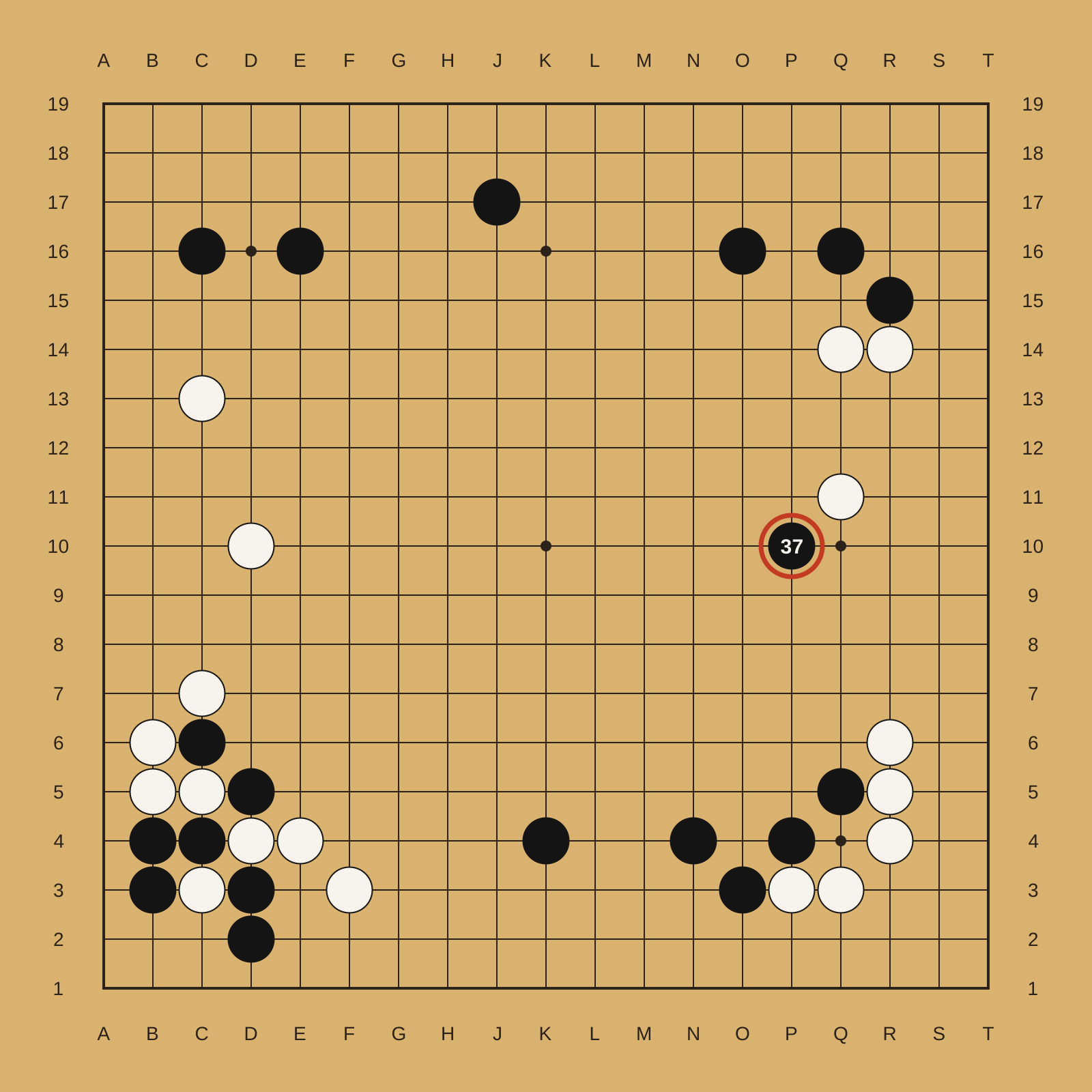
It's not a human move. I've never seen a human play this move.
AlphaGo (Google DeepMind)
Move 37, 2016
Board position after move 37 of game 2 against Lee Sedol, 10 March 2016. Reaction: Fan Hui, quoted in Wired, 11 March 2016
Google DeepMind Challenge Match, Seoul · View source ↗
Wall text
In 2017 researchers at Google described the transformer, a neural network architecture, in the paper "Attention Is All You Need". Most large language models are built on it.
OpenAI announced GPT-2 on 14 February 2019. It was trained to predict the next word in 40GB of internet text. Citing the risk of misuse, OpenAI at first released only a much smaller version. It published the full model, with 1.5 billion parameters, on 5 November 2019, as the last step of a staged release.
Models were then trained on public source code. GitHub Copilot, powered by OpenAI's Codex, suggested whole lines and functions inside the editor. Its technical preview opened on 29 June 2021. OpenAI released ChatGPT, a model that answers in conversation, as a free research preview on 30 November 2022. By 2025, agentic coding tools such as Anthropic's Claude Code could read a codebase, edit files, run tests and commit changes.
Palette · Sampled from the works shown
Board
#D8B26E
Grid line
#2B2118
Black stone
#141414
White stone
#F6F3EC
Move 37 marker
#C23B22
What changed
Code arrived a whole line or function at a time, suggested inside the editor, from GitHub Copilot's 2021 preview
A plain-language conversation became a way to ask about code, as in ChatGPT's first published sample, a bug report
Coding tools began to act as well as suggest: reading a codebase, editing files, running tests and committing changes
Releasing a model became a decision weighed against misuse, as with GPT-2's staged release in 2019
More works
Men are all alike.
IN WHAT WAY
They're always bugging us about something or other.
CAN YOU THINK OF A SPECIFIC EXAMPLE
Well, my boyfriend made me come here.
YOUR BOYFRIEND MADE YOU COME HERE
Joseph Weizenbaum
ELIZA: "Men are all alike", 1966
Conversation transcript. The capitalized lines are ELIZA's replies
Communications of the ACM 9(1), January 1966, "ELIZA—A Computer Program For the Study of Natural Language Communication Between Man and Machine" · View source ↗
System Prompt (human-written)
In a shocking finding, scientist discovered a herd of unicorns living in a remote, previously unexplored valley, in the Andes Mountains. Even more surprising to the researchers was the fact that the unicorns spoke perfect English.
Model Completion (machine-written, 10 tries)
The scientist named the population, after their distinctive horn, Ovid’s Unicorn. These four-horned, silver-white unicorns were previously unknown to science.
OpenAI (GPT-2)
The unicorn sample, 2019
A human-written prompt and the opening of the model's completion
OpenAI, "Better language models and their implications", 14 February 2019 · View source ↗
Text prompt
an armchair in the shape of an avocado. an armchair imitating an avocado.
From the post: "DALL·E appears to relate the shape of a half avocado to the back of the chair, and the pit of the avocado to the cushion."
OpenAI (DALL·E)
An armchair in the shape of an avocado, 2021
Text prompt and generated images. The images are not shown here because their copyright status is unclear
OpenAI, "DALL·E: Creating images from text", 5 January 2021 · View source ↗
User
this code is not working like i expect — how do i fix it?
resultWorkerErr := make(chan error)
defer close(resultWorkerErr)
[…]
ChatGPT
It’s difficult to say what’s wrong with the code without more context. Can you provide more information about what the code is supposed to do and what isn’t working as expected? Also, is this the entire code or just a part of it?
OpenAI (ChatGPT)
The first sample: a bug report, 2022
Conversation transcript, the first of four samples in the launch post
OpenAI, "Introducing ChatGPT", 30 November 2022 · View source ↗
Today, we're empowering developers further by introducing Claude Code—our first agentic coding tool—in a limited research preview.
Claude Code is an active collaborator that can search and read code, edit files, write and run tests, commit and push code to GitHub, and use command line tools—keeping you in the loop at every step.
Anthropic
Claude Code, 2025
Product announcement, released as a limited research preview
Anthropic, "Claude 3.7 Sonnet and Claude Code", 24 February 2025 · View source ↗
One task, every era
One small task, asking for a name and saying hello, written the way each era would have written it. The first five samples were written for this gallery and checked against the documentation of their time. The last is a single sentence, and what a model returned for it.
1977Applesoft BASIC
10 PRINT "WHAT IS YOUR NAME";
20 INPUT N$
30 PRINT "HELLO, ";N$
1977 · Applesoft BASIC · 3 lines
On the Apple II
1978C
#include <stdio.h>

main()
{
    char name[50];

    printf("What is your name? ");
    scanf("%s", name);
    printf("Hello, %s\n", name);
}
1978 · C · 10 lines
In C, K&R style
1995JavaScript
<SCRIPT LANGUAGE="JavaScript">
<!-- hide script contents from old browsers
var yourName = prompt("What is your name?", "")
document.write("Hello, " + yourName + "!")
// end hiding contents from old browsers -->
</SCRIPT>
1995 · JavaScript · 6 lines
In the browser, Netscape 2.0
Netscape, JavaScript Authoring Guide, Navigator 2.0 handbook (Internet Archive) ↗
2006JavaScript and jQuery
<input id="name"> <button id="hello">Say hello</button>
<p id="greeting"></p>
<script>
$(document).ready(function() {
  $("#hello").click(function() {
    $("#greeting").text("Hello, " + $("#name").val() + "!");
  });
});
</script>
2006 · JavaScript and jQuery · 9 lines
With jQuery 1.0
2013JavaScript with JSX (React)
/** @jsx React.DOM */
var Hello = React.createClass({
  getInitialState: function() { return {name: ''}; },
  handleChange: function(event) {
    this.setState({name: event.target.value});
  },
  render: function() {
    return <div>
      <input type="text" value={this.state.name} onChange={this.handleChange} />
      <p>Hello, {this.state.name}!</p>
    </div>;
  }
});
React.renderComponent(<Hello />, document.getElementById('example'));
2013 · JavaScript with JSX (React) · 14 lines
With React 0.4
React documentation, "Forms" and "Getting Started", React 0.4, August 2013 (Internet Archive) ↗
2026English
Make a web page that asks for my name and says hello.2026 · English · 1 line
The whole prompt, sent to a fresh agent with no other instructions
Written for this gallery
2026HTML, CSS and JavaScript
<title>Say Hello</title>
<meta name="claude:viewport-fit-sides" content="cover">
<link rel="preconnect" href="https://fonts.googleapis.com">
<link rel="preconnect" href="https://fonts.gstatic.com" crossorigin>
<link rel="stylesheet" href="https://fonts.googleapis.com/css2?family=Fraunces:opsz,wght@9..144,500;9..144,700&family=Work+Sans:wght@400;500&display=swap">
<style>
  /* Layout: one centered column, a name-tag card holding the form, greeting written in large display type */
  :root {
    --bg: #eef1f6;
    --surface: #ffffff;
    --fg: #1b2230;
    --muted: #5b6577;
    --line: #cfd6e3;
    --accent: #2f5bd3;
    --accent-fg: #ffffff;
    --font-display: "Fraunces", Georgia, "Times New Roman", serif;
    --font-body: "Work Sans", system-ui, -apple-system, "Segoe UI", sans-serif;
  }
  @media (prefers-color-scheme: dark) {
    :root:not([data-theme="light"]) {
      --bg: #12161f; --surface: #1b212d; --fg: #e8ecf4; --muted: #9aa5b8;
      --line: #313a4b; --accent: #7d9cff; --accent-fg: #0f1420; color-scheme: dark;
    }
  }
  :root[data-theme="dark"] {
    --bg: #12161f; --surface: #1b212d; --fg: #e8ecf4; --muted: #9aa5b8;
    --line: #313a4b; --accent: #7d9cff; --accent-fg: #0f1420; color-scheme: dark;
  }
  html, body { height: 100%; }
  body {
    background: var(--bg);
    color: var(--fg);
    font-family: var(--font-body);
    font-size: 1rem;
    line-height: 1.5;
    display: grid;
    place-items: center;
    padding-block: 2rem;
    padding-left: max(16px, env(safe-area-inset-left, 0px));
    padding-right: max(16px, env(safe-area-inset-right, 0px));
    box-sizing: border-box;
  }
  .tag {
    width: 100%;
    max-width: 26rem;
    background: var(--surface);
    border: 1px solid var(--line);
    border-radius: 14px;
    overflow: hidden;
  }
  .tag-head {
    background: var(--accent);
    color: var(--accent-fg);
    padding: 0.9rem 1.5rem;
    font-size: 0.75rem;
    font-weight: 500;
    letter-spacing: 0.12em;
    text-transform: uppercase;
  }
  .tag-body {
    padding: 1.75rem 1.5rem 1.5rem;
    display: grid;
    gap: 1.25rem;
  }
  h1 {
    margin: 0;
    font-family: var(--font-display);
    font-weight: 700;
    font-size: clamp(2rem, 8vw, 2.75rem);
    line-height: 1.1;
    text-wrap: balance;
    overflow-wrap: anywhere;
    min-height: 1.1em;
  }
  form { display: grid; gap: 0.5rem; }
  label { font-size: 0.875rem; color: var(--muted); }
  .row { display: flex; gap: 0.5rem; flex-wrap: wrap; }
  input {
    flex: 1 1 10rem;
    min-width: 0;
    font: inherit;
    color: var(--fg);
    background: var(--bg);
    border: 1px solid var(--line);
    border-radius: 8px;
    padding: 0.65rem 0.8rem;
  }
  button {
    font: inherit;
    font-weight: 500;
    color: var(--accent-fg);
    background: var(--accent);
    border: 0;
    border-radius: 8px;
    padding: 0.65rem 1.1rem;
    cursor: pointer;
  }
  button:hover { filter: brightness(1.08); }
  input:focus-visible, button:focus-visible { outline: 2px solid var(--accent); outline-offset: 2px; }
  .hint { margin: 0; font-size: 0.875rem; color: var(--muted); }
</style>

<main class="tag">
  <div class="tag-head">Hello, my name is</div>
  <div class="tag-body">
    <h1 id="greeting" aria-live="polite">Hello there!</h1>
    <form id="name-form">
      <label for="name">What's your name?</label>
      <div class="row">
        <input id="name" name="name" type="text" autocomplete="given-name" placeholder="Type your name" required>
        <button type="submit">Say hello</button>
      </div>
    </form>
    <p class="hint" id="hint">Enter your name and press Say hello.</p>
  </div>
</main>

<script>
  const form = document.getElementById('name-form');
  const input = document.getElementById('name');
  const greeting = document.getElementById('greeting');
  const hint = document.getElementById('hint');

  form.addEventListener('submit', (e) => {
    e.preventDefault();
    const name = input.value.trim();
    if (!name) {
      hint.textContent = 'Type a name first, then press Say hello.';
      input.focus();
      return;
    }
    greeting.textContent = `Hello, ${name}!`;
    hint.textContent = 'Nice to meet you. Try another name any time.';
  });
</script>
2026 · HTML, CSS and JavaScript · 135 lines
What came back, unedited: a styled name tag with a form, validation, dark mode and a live region for screen readers
Returned by Claude Opus 5.5 in Claude Code, 14 October 2026
What to borrow
01
Label what a machine wrote. OpenAI marked each GPT-2 sample "human-written" or "machine-written"; a page that mixes the two can do the same.
02
Ask before guessing. ChatGPT's first sample answered a vague bug report with questions. When input is ambiguous, a form or assistant can ask one clear question instead of failing.
03
Show the steps. An agent's session log lists what it read, changed and tested, so a person can check the work. Long or automated actions on a page deserve the same visible trail.
Sources
Wikipedia
arXiv (Vaswani and others, Google)
OpenAI
GitHub Blog
Wired